
If your UHS-I card records the video mode you use and your camera is ready for the next shot when you are, keep it. The UHS-I vs UHS-II decision gets more interesting when you spend time waiting for a burst of photos to save, want to use a recording mode that requires V60 or V90, or regularly copy full cards to a computer.
Those jobs call for different numbers on the card. A camera saving photos uses its write speed. A reader importing those photos uses its read speed. For video, the camera manual usually names a minimum speed class for each recording mode. One card can be fast enough for the first two jobs and still fall short of the third.
UHS-I vs UHS-II at a glance
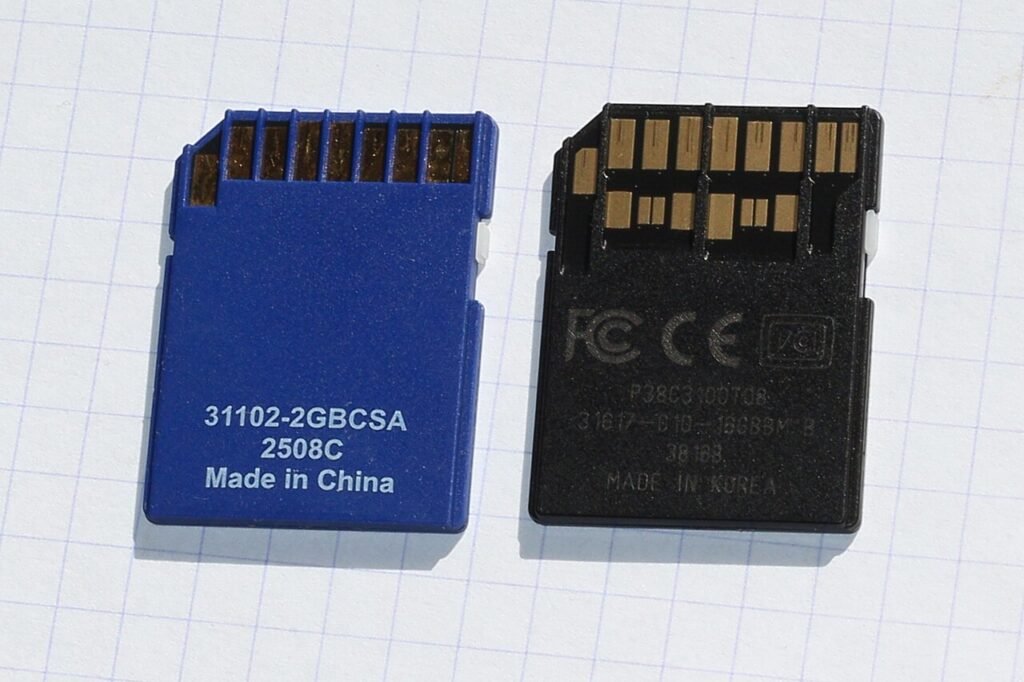
Turn the cards over. A UHS-I card has one row of metal contacts. UHS-II adds a second row that a compatible camera or reader can use to move more data. On the front, look for the Roman numeral I or II beside the SD logo. A number inside a U or beside a V describes a different feature.
| What to compare | UHS-I | UHS-II |
|---|---|---|
| Rows of contacts | One | Two |
| Highest standard bus speed | 104 MB/s | 312 MB/s with both lanes carrying data in one direction |
| Highest Video Speed Class for this bus mode | V30 | V90. Check the class printed on the individual card. |
| In a compatible UHS-I slot | Uses the mode the card and slot both support | Works through the first row of contacts at a shared lower speed |
The bus is the connection between the card and the device. UHS-II can carry data in both directions at once, at up to 156 MB/s in each direction. For a transfer one way, it can use both lanes in that direction to reach 312 MB/s. These figures describe what the connection can carry. The camera and the memory inside the card also affect how fast a file actually moves. The SD Association’s bus specifications explain the two modes.
Capacity is a separate compatibility check, particularly if you share cards between cameras. A 128 GB card belongs to the SDXC family whether it uses UHS-I or UHS-II. An older camera that accepts only SD and SDHC cards needs a different card even if the 128 GB card fits its slot. The SD Association’s card compatibility guide lists which families each device can use.
For bursts of photos, look at write speed
When you hold down the shutter to photograph a runner crossing the finish line, the camera can keep photos in an internal buffer while it writes them to the card. If you take another burst before those files finish saving, some of the buffer is still occupied. A faster write speed can shorten that wait when the camera slot supports it. For a landscape photographer taking one frame and then adjusting the composition, the card may already have finished by the next shot.
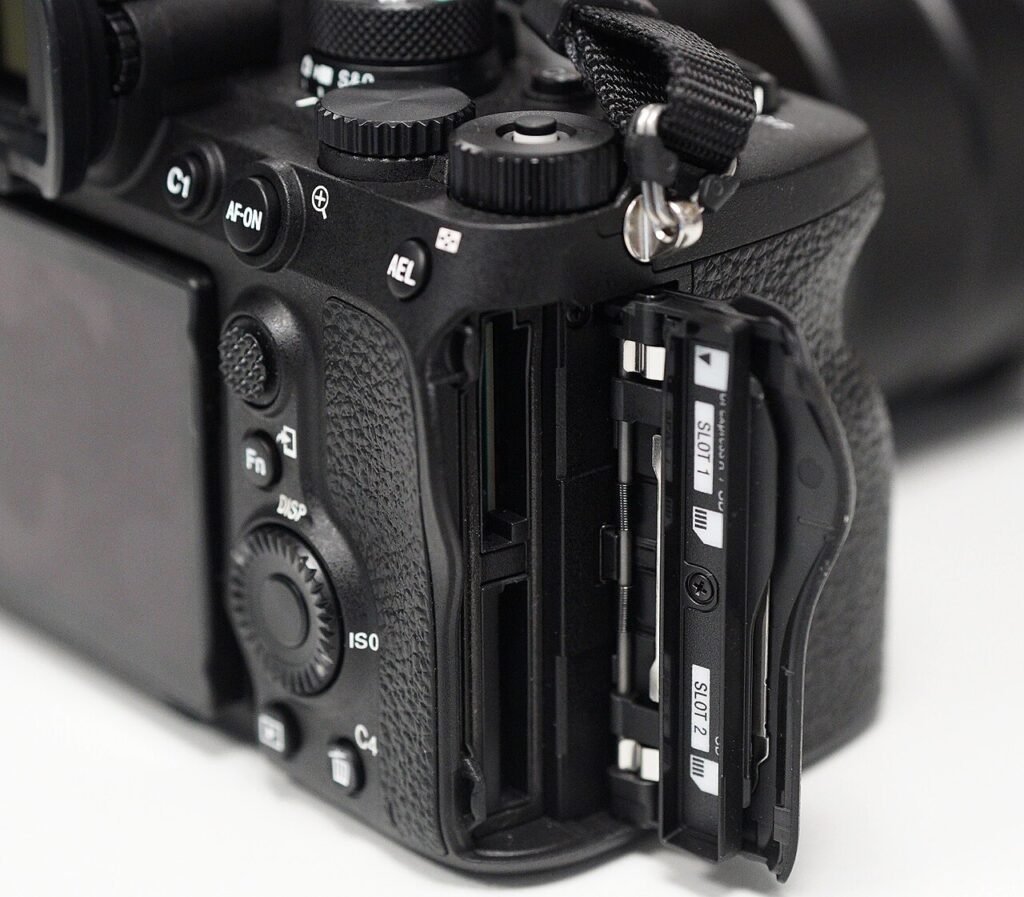
On the Sony Alpha 7 IV, you can see the difference between taking the picture and finishing the write. If you open playback just after a burst, the camera may show how many images it still has to save. Some functions are unavailable while it writes. If that wait regularly gets in the way, compare the write ratings of cards your camera supports. Sony describes the indicator in its playback guide.
Sony’s 128 GB SF-M128T shows why the individual model matters. Sony rates this UHS-II card at up to 277 MB/s for reading and 150 MB/s for writing in its fast UHS-II mode. In the UHS-I mode called SDR104, the same card is rated at up to 95 MB/s for reading and 90 MB/s for writing. If you’re comparing it with a card you already own, use the figures for the slot in your camera. All four numbers are manufacturer maximums. Sony lists the read and write ratings by mode.
For 4K video, match the recording mode
Video keeps sending data to the card throughout a take. Look for the V rating the camera maker specifies. V30, V60 and V90 identify minimum sequential write speeds of 30, 60 and 90 MB/s under the standard’s test conditions. V60 and V90 require UHS-II mode or faster. A UHS-II card can carry a lower rating, so check both marks before buying. The SD Association’s speed class guide explains how to match the symbol in the manual to the card.
Consider two ordinary movie settings on the Alpha 7 IV. For XAVC S 4K at 200 Mbps, Sony lists an SDHC or SDXC card rated U3/V30 or higher. A UHS-I card carrying those marks can do the job. Switch to XAVC S-I 4K at 600 Mbps and Sony calls for an SDXC V90 card if you’re recording to SD. Both settings produce a 4K picture. The second sends substantially more data to the card. Sony’s memory card table gives the requirements for each format, with separate entries for slow-motion shooting.
Watch the units when comparing that table with a card label. Camera bitrates use megabits per second, written Mbps. Card speeds use megabytes per second, written MB/s. Eight bits make one byte, so 600 Mbps works out to 75 MB/s. The SF-M128T has an advertised peak write speed of 150 MB/s, yet its video rating is V60. For Sony’s 600 Mbps setting, choose a card marked V90. A peak above 75 MB/s doesn’t satisfy the specified class.
Changing formats can also change how many cards you need for a shoot. With proxy recording off, Sony estimates a 128 GB SD card holds about 70 minutes of XAVC S 4K at 60p and 200 Mbps, or about 25 minutes of XAVC S-I 4K at 60p and 600 Mbps. Those are estimates of total footage that fits on the card. The subject and shooting conditions affect recording time. Sony’s recording-time table includes other capacities and settings.
For faster imports, check the reader you actually use
Once you take the card out of the camera, the reader becomes the device talking to it. You could shoot on a UHS-I camera and still benefit from a UHS-II card at your desk if your reader supports the faster interface. The reverse also applies. Put a fast UHS-II card in a compatible UHS-I reader and the second row of contacts goes unused. If copying files is the slow part of your day, check the reader model before replacing the card.
Some UHS-I packages advertise read speeds above the standard’s 104 MB/s ceiling. SanDisk, for example, specifies up to 250 MB/s when its 2 TB Extreme PRO SDXC UHS-I card is paired with its QuickFlow SD UHS-I USB-A reader. The pair uses proprietary technology, and SanDisk says actual performance depends in part on the host device. That figure applies to a specific import setup. It gives you no basis for predicting how quickly the same card will save a burst in your camera. SanDisk identifies the card and reader used for its speed rating.
If you’re packing for a shoot, start with the most demanding mode you plan to use. A compatible UHS-I V30 card can cover the Alpha 7 IV’s ordinary 200 Mbps XAVC S 4K recording. Pack an SDXC V90 card for its 600 Mbps XAVC S-I 4K mode. If you shoot stills and already have a UHS-II card, check the slot at your desk before buying a second one. A reader with the extra contacts may be the only part you’re missing.