
If you rename takes/session.wav, a hard link named mix/intro.wav will still play the same recording. A symbolic link that points to the old name will stop working unless another file takes its place. The difference between hard links vs symbolic links comes down to what you want the player to open: one particular take, or whichever take you put at a particular path.
With a hard link, the recording has two names. You can open it through either one. A symbolic link, often called a symlink, stores a path that the operating system follows when you open the link. Both can sound exactly the same when you press Play. If you need to edit the intro and keep the session recording untouched, give the editor an independent working copy. The Linux manual on links explains how each kind of link refers to a file.
Renaming a take and replacing it
Suppose you give the session recording a more descriptive name but leave the player set to open mix/intro.wav. If the intro is a hard link, the player can still open the take because the rename changed only its name in the takes folder. You can even remove that name and continue playing the recording through its name in the mix folder.
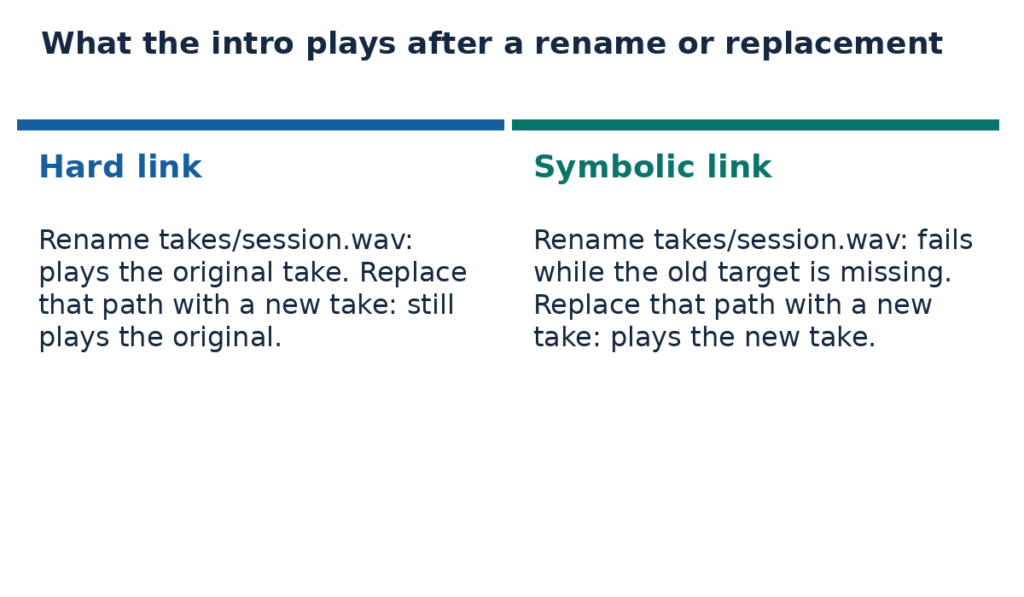
Now suppose you keep the name takes/session.wav and replace the recording. On Linux, you can do that by renaming a new take over the existing file. The Linux manual for rename explains that other hard links to the file being replaced are unaffected. If mix/intro.wav is a hard link, it still plays the first take. If it’s a symbolic link, the player follows the stored path the next time it opens the intro and finds the new take.
What happens when you save an edit
An audio editor can write changes directly into the open file. If you trim the first take this way, you’ll hear the shorter version through either hard-linked name. You’ll also hear the trim through a symbolic link that leads to the recording. Keeping a second name in the mix folder gives you another way to open the edited audio.
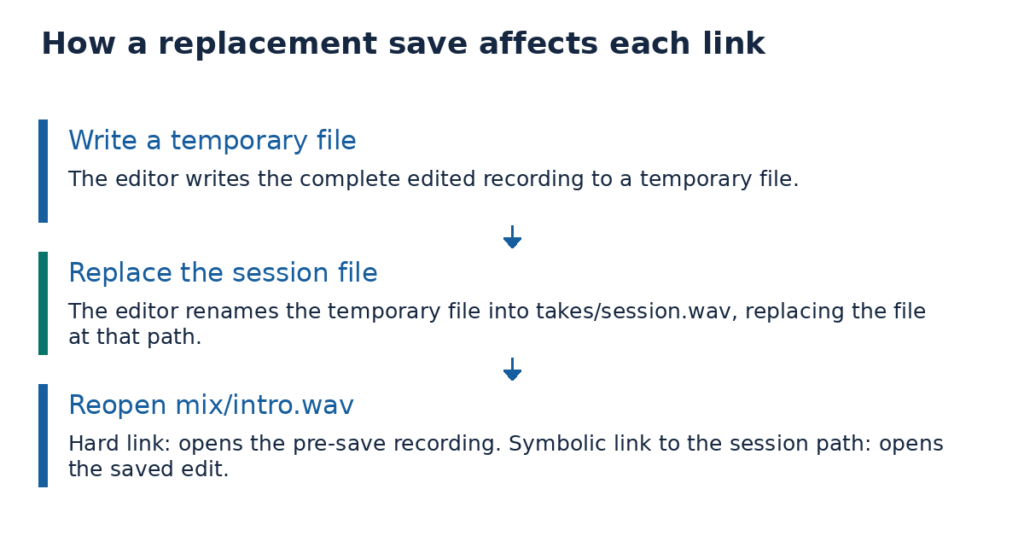
Some applications replace the file when you click Save. Qt’s QSaveFile documentation describes how an application can finish writing a complete temporary file and then rename it into place. If the editor saves the session recording this way, a hard link in the mix folder still opens the take as it was before the edit. A symbolic link to the session path opens the saved version. An independent working copy lets you trim the intro and preserve the session take with either save method.
Moving the project or sharing a library
On Linux, a relative symbolic link starts in the directory that contains the link. If the intro link stores ../takes/session.wav, the system starts in mix, goes up to the project folder, then enters takes to find session.wav. You can rename the project folder or move the whole project and the route still works as long as mix and takes keep their positions. Move just the mix folder elsewhere and the same route leads somewhere else. The Linux guide to resolving paths explains how the system follows a relative link.
An absolute path suits a sound library that stays in one place. A link to /srv/audio/session.wav keeps looking there wherever you move the project. That also explains why a project that plays on your computer can fail on a collaborator’s. Their computer looks for the recording at that same absolute path. If they keep the library elsewhere, the link won’t open the take.
Hard links work for files on the same filesystem. On Linux and NTFS, ordinary hard links aren’t available for directories. A symbolic link can point to a directory, and its target can be on another volume. On Windows, the type of path matters. Microsoft’s guide to symbolic links gives the rules for linking to a server library with an absolute network path such as \\studio\audio. Windows restricts relative symbolic links to one volume. For a folder on another local volume, a Windows directory junction is also an option. Microsoft’s guide to hard links and junctions covers junctions and hard-linked file names on a single NTFS volume.
Check which link you have
On Linux, open a terminal in the project folder and use GNU ls to list both entries. This command shows their inode numbers without changing either entry.
ls -li takes/session.wav mix/intro.wavIf both entries are ordinary files on the same filesystem, matching inode numbers mean the two names identify the same file. Compare the numbers only within one filesystem because another filesystem can use the same number for a different file. The Linux inode manual explains how these numbers identify files.
For a symbolic link, look for an arrow after the link name in the long listing. The path after the arrow is the one the link stores. You can still read it after a take has moved to see where the player expects to find the recording. In the relative-link example, the output is ../takes/session.wav. To print just the stored path, run this command from the project folder.
readlink mix/intro.wavThe readlink manual also lists options for resolving that path further.
On a Windows 11 NTFS volume, open Command Prompt in the project folder and list the recording’s hard-linked names using Microsoft’s fsutil hardlink command.
fsutil hardlink list takes\session.wavLook for the intro in the list. If the mix entry appears, it’s another name for the session recording.
Archive the recording a collaborator needs
By default, GNU tar stores a symbolic link with its path. If you archive the project folders and the intro points to a library outside them, your collaborator gets the link and may be missing the audio. The tar manual describes the --dereference option, which follows symbolic links while building the archive. Check where the links lead before using it. Following a link to a library directory can bring the directory’s contents into the archive.
When GNU tar encounters two hard-linked names for a recording, it normally stores the audio once. For the other name, it records a hard link to the first entry. Extracting only the second entry can fail if the first is missing at the destination. If your collaborator needs the complete project, extract both entries together. If they only need the intro, package that recording on its own so they can extract it without having to find the session entry. The GNU tar guide to hard links describes how these entries are stored and restored.